



In an era defined by constant notifications, algorithmic feeds, and fragmented attention, the ability to achieve deep focus has become a competitive advantage. Whether you're a knowledge worker, student, or entrepreneur, sustained concentration is directly tied to productivity and output quality. Rather than relying purely on willpower, many professionals now turn to specialized mobile applications designed to minimize distractions, structure time, and reinforce cognitive discipline.
This article explores the top 5 mobile apps specifically optimized for deep focus and distraction-free work. Instead of generic productivity tools, these apps target a single critical aspect: helping users enter and maintain a flow state. We will analyze their mechanics, use cases, and strategic value in a modern workflow.
1. Understanding Deep Focus in the Digital Age
Deep focus refers to a cognitive state where attention is fully immersed in a single task, often resulting in higher efficiency and creativity. In contrast, shallow work—like checking emails or scrolling social media—fractures attention and reduces output quality. Modern mobile ecosystems are engineered to capture attention, making deep focus increasingly difficult to achieve.
Applications designed for focus attempt to counteract these forces by imposing constraints. They limit distractions, gamify concentration, or create structured work intervals. Understanding how these mechanisms work is essential before selecting the right tool.
Key Challenges
- Constant push notifications
- Dopamine-driven app usage
- Multitasking habits
Core Requirement
A system that enforces intentional usage rather than relying on discipline alone.
2. Criteria for Selecting Focus Apps
Not all productivity apps are built equally. For deep focus specifically, the evaluation criteria differ from general task management tools. The best apps emphasize behavioral reinforcement, minimal UI friction, and measurable outputs.
We selected apps based on their ability to reduce distractions, support structured work sessions, and integrate seamlessly into daily routines without overwhelming the user.
Evaluation Metrics
- Distraction blocking capability
- Time structuring features (e.g., Pomodoro)
- User engagement without over-gamification
Bonus Factors
Cross-device sync and analytics dashboards for performance tracking.
3. Forest: Gamifying Focus Through Commitment
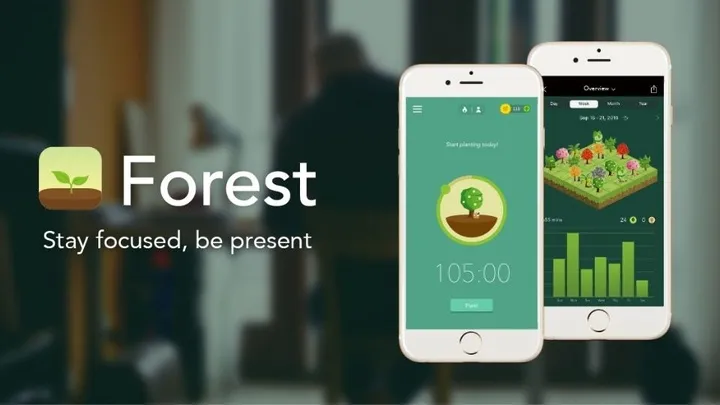
Forest transforms focus into a visual and emotional experience. When users start a focus session, a virtual tree begins to grow. Leaving the app prematurely causes the tree to die, creating a subtle psychological cost for distraction.
This mechanism leverages commitment bias and visual reinforcement. Over time, users build a “forest,” representing accumulated focus hours, which strengthens habit formation.
Key Features
- Pomodoro-based timer
- Visual progress tracking
- Real-world tree planting integration
Best Use Case
Ideal for users who respond well to gamification and visual motivation.
4. Freedom: Total Distraction Elimination
Freedom is designed for aggressive distraction blocking. It allows users to block websites, apps, or even the entire internet during scheduled sessions. Unlike lighter tools, Freedom enforces strict boundaries.
This app is particularly effective for users who struggle with impulse control. By removing access entirely, it eliminates the need for decision-making during focus periods.
Core Capabilities
- Cross-device blocking
- Scheduled sessions
- Custom blocklists
Strategic Advantage
Pre-commitment to focus sessions reduces cognitive load and temptation.
5. Focus To-Do: Structured Work Execution
Focus To-Do combines task management with the Pomodoro technique, making it a hybrid solution. Users can assign tasks to timed sessions, creating a clear link between planning and execution.
This integration helps reduce procrastination by breaking large tasks into manageable intervals, reinforcing momentum through completion cycles.
Notable Features
- Task list integration
- Pomodoro timer
- Productivity reports
Ideal For
Users who need both structure and execution tracking in one tool.
6. Noisli: Optimizing the Acoustic Environment
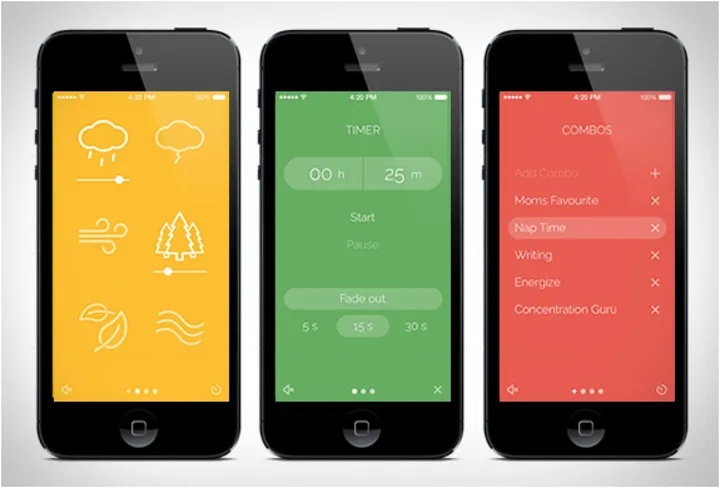
Noisli addresses a less obvious but critical factor: sound. Background noise can significantly impact concentration, especially in unpredictable environments.
The app provides customizable ambient sounds—such as rain, white noise, or café chatter—to create a consistent auditory environment that enhances focus.
Sound Categories
- Nature sounds
- White and pink noise
- Urban ambiance
Use Case
Perfect for remote workers or those in noisy environments.
7. RescueTime: Data-Driven Focus Improvement
RescueTime operates on analytics rather than enforcement. It tracks how users spend time across apps and websites, providing detailed reports on productivity patterns.
This data enables users to identify inefficiencies and adjust behavior accordingly. Over time, it builds self-awareness, which is essential for sustainable focus improvement.
Analytics Features
- Automatic activity tracking
- Productivity scoring
- Detailed reports
Best For
Users who prefer insight-driven optimization over strict blocking.
8. Combining Apps for Maximum Efficiency
No single app covers all aspects of deep focus. Advanced users often combine multiple tools to create a layered system. For example, using Freedom for blocking, Forest for motivation, and RescueTime for analytics creates a comprehensive workflow.
This multi-tool strategy mirrors enterprise productivity systems, where different tools handle execution, monitoring, and optimization.
Example Stack
- Blocking: Freedom
- Execution: Focus To-Do
- Tracking: RescueTime
Outcome
A closed-loop productivity system with feedback and enforcement.
9. Behavioral Psychology Behind Focus Apps
These apps are not just technical tools—they are behavioral systems. They rely on principles like loss aversion (Forest), pre-commitment (Freedom), and feedback loops (RescueTime).
Understanding these mechanisms allows users to select apps that align with their psychological tendencies, increasing adoption and effectiveness.
Key Principles
- Habit formation
- Reward systems
- Cognitive load reduction
Insight
The most effective app is the one that aligns with your behavioral profile.
10. Future Trends in Focus Technology
The next generation of focus apps will likely integrate AI-driven personalization. Instead of static timers, systems will adapt dynamically based on user behavior, energy levels, and task complexity.
Additionally, deeper integration with operating systems may allow for more seamless and less intrusive focus environments, reducing reliance on manual setup.
Emerging Trends
- AI-driven focus scheduling
- Biometric feedback integration
- Context-aware blocking systems
Implication
Focus tools will evolve from reactive systems to proactive assistants.
Conclusion
Deep focus is no longer a natural state—it is a skill that must be engineered through systems and tools. The five apps discussed—Forest, Freedom, Focus To-Do, Noisli, and RescueTime—each address a specific dimension of concentration, from behavioral reinforcement to environmental control and data analysis.
Rather than searching for a single perfect solution, the most effective approach is to build a personalized stack that aligns with your workflow and psychology. In doing so, you transform focus from a fragile resource into a scalable advantage.