How To Play Roblox A Complete Guide For Beginners
Roblox is an online gaming platform where players can explore thousands of experiences created by developers and other members of the community. Instead of being only one game Roblox provides many different types of experiences including adventure games role playing games racing games simulation games survival games building games and social games. This variety makes Roblox popular with both new and experienced players
If you are new to Roblox you may not know where to begin. Learning how to create an account find games control your character customize your avatar communicate with other players and stay safe can make your first experience much easier. This guide explains how to play Roblox step by step from the moment you start the platform until you become comfortable exploring different experiences
The following sections are organized in a simple order so you can follow them from beginning to end. You will also learn useful tips for choosing games managing your Roblox account improving your gameplay and enjoying the platform responsibly
1 How To Create A Roblox Account
The first step to playing Roblox is creating an account. An account allows you to save your progress use your avatar join experiences communicate with other players and manage your personal settings. You can create an account through the official Roblox website or through the Roblox application on a supported device
When creating your account you will normally need to provide basic information such as your birthday username and password. Choose a username that you are comfortable using for a long time because it can become part of your identity on the platform. Your password should be difficult for other people to guess and should not be shared with friends or strangers
After creating your account you can sign in and begin exploring Roblox. Take some time to review your account settings before entering games. Understanding your privacy and security options early can help protect your account later
2 How To Download And Open Roblox
Roblox can be played on several supported devices. Depending on your device you may be able to use a computer mobile device console or another supported platform. Visit the official Roblox platform or the appropriate application store for your device and install the Roblox application
After installation open Roblox and sign in with your account. The main screen will show different experiences that you can explore. You may see recommended games popular experiences recently played games and experiences based on your interests
Before starting a game make sure your device has a stable internet connection. A stronger connection can reduce problems such as delayed movement disconnections and slow loading. If an experience takes a long time to load you can wait for the process to finish before deciding whether there is a problem
You should also keep Roblox updated. Updates can improve performance add features and resolve technical problems. Using an older version may sometimes prevent you from accessing certain experiences correctly
3 How To Find A Roblox Game
One of the most important skills for a new Roblox player is learning how to find experiences that match your interests. Roblox contains a huge number of games so you do not have to play the first experience that appears on your screen
Use the search function to look for a specific game or a particular type of experience. For example you can search for adventure survival racing building role playing or simulation experiences. If you already know the name of a game entering the exact name into the search box can make it easier to find
Before joining an unfamiliar experience look at the available information. Pay attention to the title description thumbnail and player activity. You can also read reviews or comments when available to understand what other players think about the experience
A useful way to choose an experience is to consider the following factors
Game type and gameplay style
Number of active players
Recent updates
Player feedback
Difficulty level
Device compatibility
Remember that popularity does not always mean that a game will be enjoyable for you. Try different experiences until you find genres that match your personal preferences
4 How To Join And Start Playing A Roblox Experience
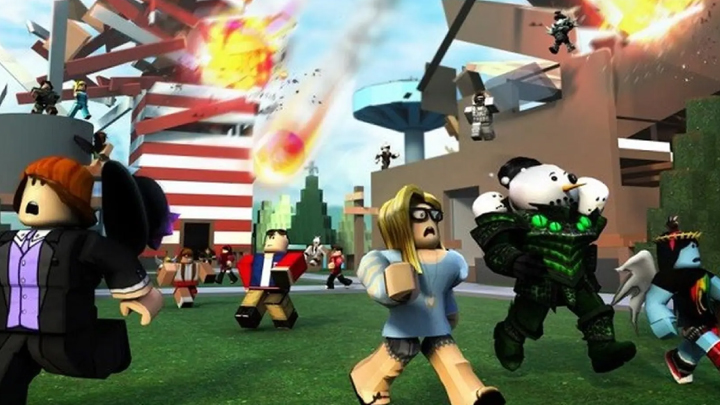
Once you have found an experience you want to try select it and choose the option to start playing. Roblox will load the experience and place your character into the game world. The loading time depends on your device internet connection and the complexity of the experience
When you enter a new game spend a few moments learning the environment. Many Roblox experiences provide instructions at the beginning. Read these instructions carefully because they can explain the main objective controls and important game mechanics
Most experiences allow you to control your character using movement controls provided by your device. On a computer you may use the keyboard and mouse while mobile devices normally use touch controls. Consoles can use their respective controllers
Do not worry if you make mistakes during your first few minutes. Every experience can have different controls and objectives. Some games are simple while others have complicated systems involving equipment quests characters maps and progression
Try to identify the main objective first. Ask yourself what the game expects you to accomplish. You may need to survive for a certain amount of time collect items complete missions defeat opponents build structures or cooperate with other players
5 How To Customize Your Roblox Avatar
Your avatar represents you on Roblox and can be customized in many different ways. You can change clothing accessories body appearance and other visual elements depending on the items available to your account
To customize your avatar open the avatar or character customization area of Roblox. From there you can browse the available categories and choose different items. You may be able to change shirts pants accessories hairstyles faces and other parts of your appearance
Some avatar items are available without spending Robux while other items may require Robux. Robux is the virtual currency used on Roblox for certain purchases. You should always understand what an item costs before making a purchase
A good beginner approach is to start with free customization options. Experiment with different combinations and create an appearance that you like without feeling pressured to buy expensive items
Your avatar can also change depending on the experiences you play. Some games provide special items or temporary appearances that are only available within that experience. These items may not always be part of your permanent Roblox avatar
6 How To Learn The Controls And Game Rules
Every Roblox experience can have different rules and controls. Learning them is one of the fastest ways to improve your gameplay
When you enter a new experience look for an instructions area tutorial menu or control guide. Some games explain the controls automatically while others require you to explore the menu
Start with basic actions such as movement jumping interacting with objects opening menus and using items. Once you understand these actions you can focus on the special mechanics of the game
For example a survival experience may require you to collect resources and protect yourself while a racing experience may focus on vehicle controls. A role playing experience may involve communication exploration and interaction with other characters
You can improve faster by practicing one mechanic at a time. Instead of trying to understand every feature immediately focus on the most important objective
If you lose or fail do not immediately leave the game. Think about what caused the failure and try a different strategy. Learning from mistakes is an important part of improving in almost every Roblox experience
7 How To Play With Other Roblox Players
Roblox is designed around social interaction and many experiences are more enjoyable when played with other people. You can meet friends join groups and participate in cooperative activities depending on the experience
When playing with others remember that every player is a real person. Treat other players respectfully and avoid behavior that makes the experience unpleasant for everyone
Communication can be useful when an experience requires teamwork. Players may need to divide tasks share resources protect each other or coordinate strategies
You should also be careful about sharing personal information. Do not give strangers information such as your home address phone number passwords private account details or other information that should remain private
If another player behaves inappropriately Roblox provides tools that can help you manage your interactions. You can use available privacy and safety controls to reduce unwanted communication
Playing with friends can make Roblox more enjoyable because you can explore new experiences together. You can also recommend games to each other and learn different strategies

8 How To Use Robux Carefully
Robux is the virtual currency used across Roblox for certain digital purchases. Players can use Robux to obtain avatar items game related products and other available content
New players should understand that Robux is not required to enjoy every Roblox experience. Many games can be played without purchasing anything
If you decide to use Robux set a spending limit before making purchases. Avoid buying an item simply because another player has it. Think about whether the purchase will actually improve your experience
You should also be careful with websites or people promising free Robux. Offers that ask for your password or other sensitive account information can put your account at risk
Never give your Roblox password to another person. Legitimate Roblox features should not require you to share your password with another player
Before making any purchase check the price and understand what you are receiving. Taking a few seconds to confirm the purchase can help prevent accidental spending
9 How To Stay Safe While Playing Roblox
Online safety is an important part of enjoying Roblox. Because Roblox connects millions of players you may encounter people you do not know. Learning basic safety habits can protect your account and personal information
Use a strong unique password and avoid using the same password on multiple services. If Roblox offers additional account security options for your account use them when appropriate
Never share your password with anyone. This includes people who claim to be friends game developers moderators or other trusted users. If someone asks for your password treat the request as suspicious
Be careful when clicking links sent by strangers. A message may claim that you won a prize received free Robux or need to verify your account. Do not enter your login information on unfamiliar websites
If another player makes you uncomfortable you can use Roblox privacy and reporting tools. Blocking or reporting inappropriate behavior can help you control your online experience
Parents and guardians can also review available safety settings when younger players use Roblox. Understanding privacy controls communication settings and account restrictions can provide additional protection
The most important safety rules are simple
Never share your password
Do not share private personal information
Avoid suspicious links
Do not trust unrealistic free Robux offers
Report inappropriate behavior
Use privacy settings when necessary
10 How To Improve Your Roblox Skills And Enjoy More Experiences
After you understand the basics you can start improving your skills and exploring more advanced experiences. The best way to improve is to play regularly while paying attention to how each game works
Try different genres instead of playing only one type of experience. You may discover that you enjoy genres you had never considered before. Adventure games can improve exploration skills while strategy games can encourage planning and simulation games can introduce resource management
You can also learn by watching experienced players or reading game guides. When learning from other players focus on understanding their decisions rather than simply copying every action
If a game has missions quests achievements or progression systems create small goals for yourself. For example you might decide to complete your first major mission collect a particular item reach a new area or improve your previous score
Playing with experienced friends can also help you learn faster. They may explain mechanics that are difficult to understand when you are playing alone
Another important part of improving is learning when to take a break. Spending too much time playing without breaks can make the experience less enjoyable. Balance gaming with school work sleep exercise family time and other activities
As you become more comfortable with Roblox you may also become interested in creating your own experiences. Roblox provides tools that allow creators to design interactive worlds and develop their own gameplay ideas. Creating games requires more advanced skills but it can be a rewarding next step for players who enjoy building and experimenting
Conclusion
Learning how to play Roblox does not require complicated knowledge. Start by creating a secure account downloading the platform and finding experiences that match your interests. Once you enter a game take time to understand the controls objectives and rules before trying to master advanced mechanics
Customizing your avatar can help you create your own identity while playing with friends can make many experiences more enjoyable. At the same time it is important to use Robux carefully and protect your account from suspicious offers and unsafe interactions
The most important thing is to explore at your own pace. Roblox contains many different experiences so there is always something new to discover. Try different genres learn from other players and develop your skills through practice
With good account security responsible spending respectful communication and smart gaming habits you can enjoy Roblox while making your time on the platform safer and more rewarding